

When it comes to choosing the right ergonomic mouse in 2025, you’ll find a variety of options tailored to different needs. From the Logitech MX Vertical, designed to reduce muscle strain, to the versatile Microsoft Adaptive Mouse that supports users with mobility challenges, there’s something for everyone. Each option offers unique features that can greatly enhance your comfort and productivity. Curious about which mouse will best suit your workflow or lifestyle? Let’s explore the top contenders that could transform how you interact with your devices.
Logitech MX Vertical

The Logitech MX Vertical is designed with your comfort in mind, considerably reducing muscle strain by up to 10% during prolonged use. Its 57-degree tilt angle encourages a natural wrist position, minimizing discomfort associated with traditional mouse designs.
This ergonomic orientation allows you to maintain a more relaxed posture, which is essential for long hours of work or gaming.
Made from premium rubber and aluminum, the MX Vertical boasts a sturdy yet comfortable grip. You’ll appreciate its dual connectivity options; you can connect via USB-C or Bluetooth, providing flexibility depending on your setup.
With a remarkable battery life of up to four months on a single charge, it reduces the hassle of frequent recharging.
Priced at $100, the MX Vertical is recognized as one of the best ergonomic mice available. It features customizable buttons, allowing you to tailor your experience to your specific workflow.
This mouse not only enhances comfort but also improves productivity through its thoughtful design. For anyone seeking a balance between ergonomic support and performance, the Logitech MX Vertical stands out as an excellent choice.
Logitech Lift Vertical Mouse
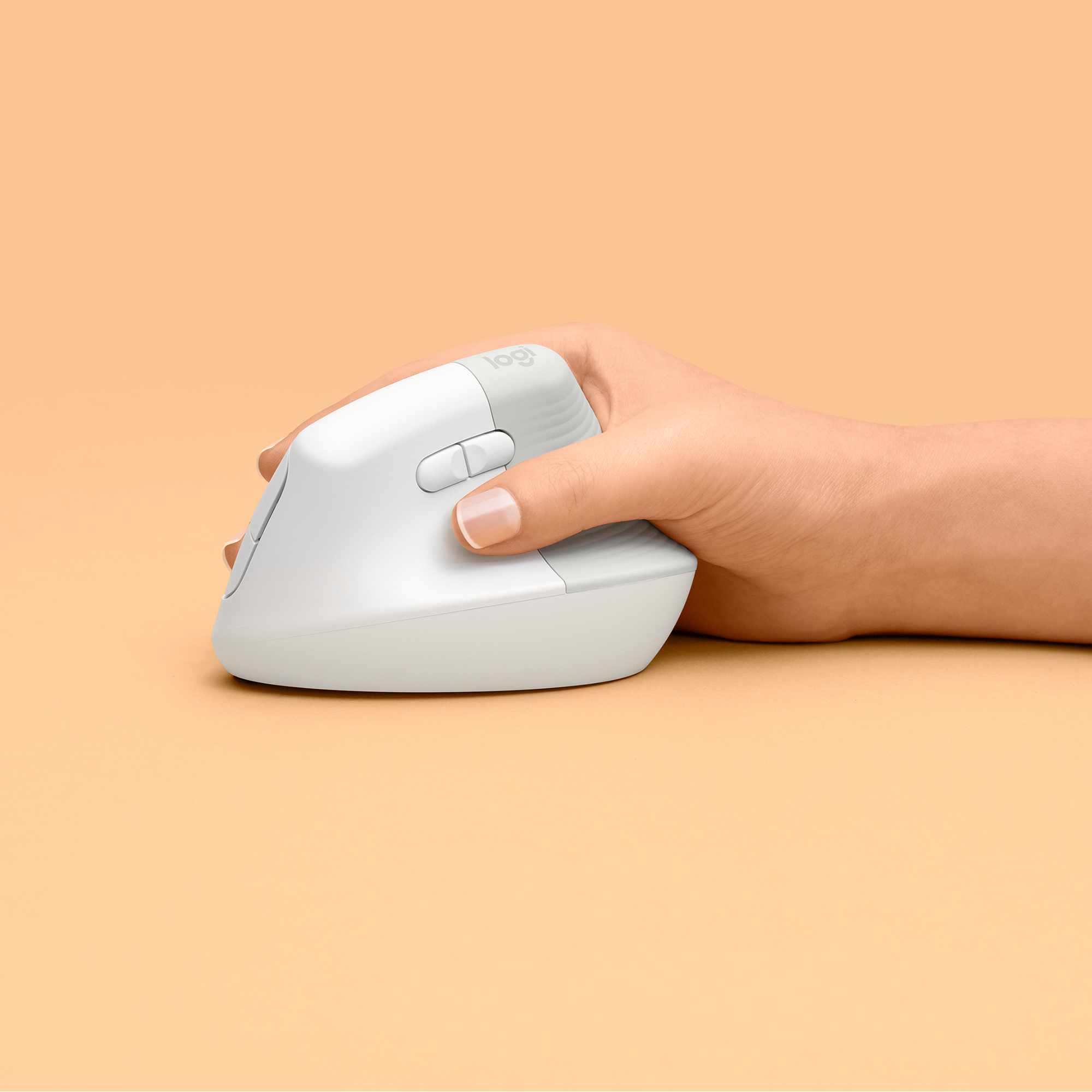
If you’re looking for an ergonomic mouse that caters specifically to smaller hands, the Logitech Lift Vertical Mouse could be your ideal solution. This mouse is designed to promote a natural handshake position, which greatly reduces wrist strain and discomfort during prolonged use.
With its sculpted design, you’ll find it fits comfortably in your grip, making those long hours at the computer much more bearable.
Here are some key features:
- Six Programmable Buttons: Customize functionality to suit your workflow.
- Adjustable DPI: Ranges from 400 to 4000 for precise tracking.
- Long Battery Life: Operates on a single AA battery, lasting up to two years.
- Left-Handed Version Available: Catering to both right and left-handed users.
The Lift Vertical Mouse stands out due to its emphasis on comfort for smaller hands while still delivering robust functionality.
Its ergonomic design encourages a more natural wrist position, helping you avoid strain and fatigue. Overall, it’s a commendable choice for anyone seeking an ergonomic solution tailored to their specific hand size.
Contour Design Unimouse
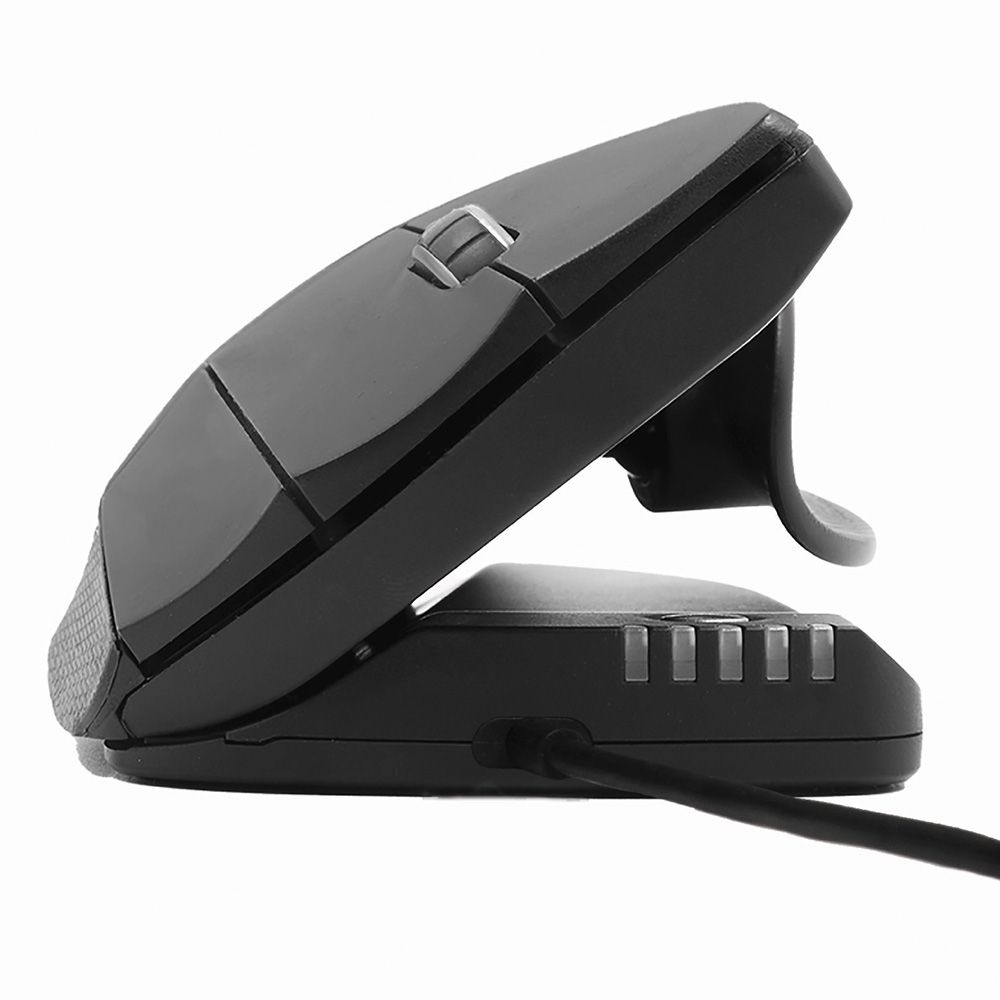
The Contour Design Unimouse stands out with its adjustable angle and thumb rest, allowing you to customize your comfort level for prolonged use.
You’ll find six programmable buttons at your fingertips, which enhance your productivity by assigning specific functions to suit your workflow.
However, it’s crucial to take into account its noted durability concerns as you weigh its ergonomic benefits.
Adjustable Comfort Features
Adjustable comfort features in the Contour Design Unimouse set it apart as an innovative choice for users seeking relief from wrist pain and joint discomfort. This ergonomic mouse allows you to customize your experience for ideal comfort, which is essential during long hours of use. You can adjust the angle of the mouse to fit your hand’s natural position, reducing strain on your wrist.
Key features that enhance comfort include:
- Fully adjustable angle: Tailor the angle to match your hand’s natural posture, preventing awkward wrist movements.
- Customizable thumb rest: Supports your thumb, promoting a relaxed grip and reducing fatigue.
- Multiple DPI settings: Choose from ten cursor speed options to suit different tasks and preferences.
- Comfortable grip surface: Designed with materials that provide a soft touch, enhancing overall hand comfort during use.
These features collectively contribute to a more personalized and ergonomic experience. By addressing individual needs, the Contour Design Unimouse stands out as a practical solution for those looking to alleviate discomfort while using a mouse.
Programmable Button Functionality
With six programmable buttons at your fingertips, the Contour Design Unimouse allows for significant customization, enhancing your workflow and productivity. Each button can be assigned to execute specific commands, macros, or shortcuts, which can streamline repetitive tasks and minimize the time you spend maneuvering software.
You can tailor these settings to fit your individual needs, whether you’re a designer requiring quick access to tools or a programmer needing shortcuts to streamline code editing. The user-friendly interface of the accompanying software makes it easy to configure these buttons, ensuring you can adapt the mouse to your personal workflow efficiently.
Moreover, the ability to adjust cursor speed across ten different options means you can optimize your sensitivity settings, catering to both precision tasks and broader movements. This level of customization not only helps improve your efficiency but also reduces the likelihood of repetitive strain injuries by allowing you to create a setup that feels most comfortable for you.
Ultimately, the programmable button functionality of the Contour Design Unimouse stands out as a crucial feature that enhances your overall experience, making your work more fluid and less physically taxing.
Microsoft Adaptive Mouse

The Microsoft Adaptive Mouse stands out with its customizable ergonomic features, allowing you to tailor the mouse to your specific mobility and input needs.
Its Bluetooth connectivity guarantees compatibility with a wide range of devices, making it versatile for different setups.
This mouse is particularly beneficial for users who require additional support due to limited mobility, enhancing their overall computing experience.
Customizable Ergonomic Features
For those seeking a highly customizable ergonomic experience, the Microsoft Adaptive Mouse stands out with its unique design tailored to various mobility needs. This mouse allows you to create a setup that fits your individual preferences, making it an excellent choice for users with specific ergonomic requirements.
Here are some of the key customizable features:
- Adjustable Components: You can modify the mouse’s shape and size with attachable accessories, accommodating different grip styles.
- Programmable Buttons: Customize button functions to streamline your workflow, enhancing productivity.
- DPI Settings: Adjust the sensitivity up to 6,000 DPI, providing precise control for various tasks.
- Multiple Connection Options: Connect via Bluetooth or USB, offering flexibility in how you use the mouse.
The modular approach of the Microsoft Adaptive Mouse emphasizes comfort and functionality, ensuring that you can tailor it to your unique needs. Regular updates to the mouse’s software can also enhance its performance and compatibility over time.
Whether you have limited mobility or simply prefer a personalized setup, this mouse provides a level of customization that can markedly enhance your overall experience.
Compatibility With Devices
Customizing your ergonomic setup with the Microsoft Adaptive Mouse is not just about comfort; it’s also about compatibility with a wide range of devices. This mouse supports Bluetooth connectivity, making it easy to pair with various operating systems, including Windows, macOS, and even some mobile devices. Its versatility allows you to switch between devices seamlessly, enhancing your productivity. Moreover, having user-friendly navigation can significantly improve your experience when managing different device connections.
Here’s a quick breakdown of the Microsoft Adaptive Mouse’s compatibility features:
| Device Type | Compatibility |
|---|---|
| Windows PCs | Yes |
| MacOS Devices | Yes |
| Android Tablets/Phones | Limited (depends on app support) |
Additionally, the mouse’s 6,000-DPI sensor guarantees precise tracking across different surfaces, so you won’t struggle with performance regardless of your setup. However, to access its full potential, you may need to purchase additional accessories tailored to your specific ergonomic needs. This adaptability makes the Microsoft Adaptive Mouse an excellent choice whether you’re working from a home office, a shared workspace, or on the go. Its design not only accommodates various user preferences but also aligns with your unique mobility requirements. Moreover, ensuring effective search tools can significantly enhance user engagement and satisfaction when navigating through different devices and settings.
Ideal for Mobility Needs
While many mice cater to general ergonomic needs, the Microsoft Adaptive Mouse stands out by specifically addressing mobility challenges.
It’s designed for users requiring customized input solutions, making it an excellent choice if you have unique ergonomic needs. This mouse features an adaptable design that allows you to tailor its components to fit your comfort, thereby promoting a better user experience.
Key features include:
- Customizable Components: You can attach different accessories based on your needs, enhancing usability.
- Bluetooth Connectivity: It connects seamlessly with most devices, eliminating the hassle of cables.
- High Precision: With its 6,000-DPI sensor, you get accurate tracking, making navigation effortless.
- Accessibility Focus: The design supports users with limited mobility, ensuring everyone can use it effectively.
The Microsoft Adaptive Mouse isn’t just a tool; it’s a solution for those who may struggle with traditional mice.
Anker Wireless Vertical Mouse

Offering a budget-friendly solution for those seeking ergonomic comfort, the Anker Wireless Vertical Mouse stands out with its unique design tailored for larger hands. Its vertical orientation allows for a natural grip, which can help reduce wrist strain over prolonged use. You’ll appreciate its multiple DPI settings (800, 1200, 1600) that cater to different sensitivities, making it versatile for various tasks, from browsing to graphic design.
| Feature | Description |
|---|---|
| DPI Options | 800, 1200, 1600 |
| Button Count | 5 programmable buttons |
| Power Source | 2 AAA batteries |
| Power Saving | Activates after 8 minutes of inactivity |
While the Anker Wireless Vertical Mouse is well-suited for larger hands, it may not be the best fit for users with smaller hands. Additionally, its power-saving mode guarantees that battery life is optimized, allowing for extended use without frequent battery changes. Overall, if you’re looking for an affordable ergonomic mouse that prioritizes comfort and functionality, the Anker Wireless Vertical Mouse is a solid choice worth considering.
Kensington Pro Fit Ergo TB550
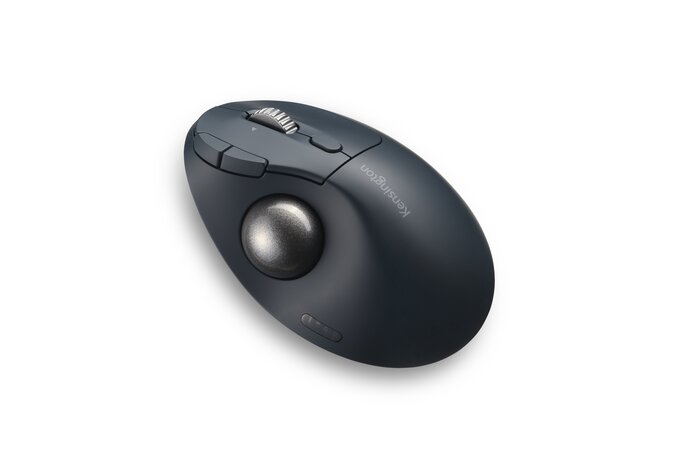
The Kensington Pro Fit Ergo TB550 presents a unique ergonomic solution specifically designed for right-handed users who prefer a trackball mouse.
This mouse features a large trackball that you control with your thumb, minimizing wrist movement and promoting a more natural hand position.
Here are some key features to evaluate:
- Wireless Convenience: The mouse connects wirelessly, providing flexibility and reducing desk clutter.
- Rechargeable Battery: With a battery life of up to four months on a single charge, you won’t have to worry about constant replacements.
- Programmable Buttons: It includes five programmable buttons that allow you to customize your experience and streamline tasks.
- DPI Sensitivity: While the sensor sensitivity is capped at 1,600 DPI, it still delivers adequate precision for everyday tasks.
Logitech MX Master 3s
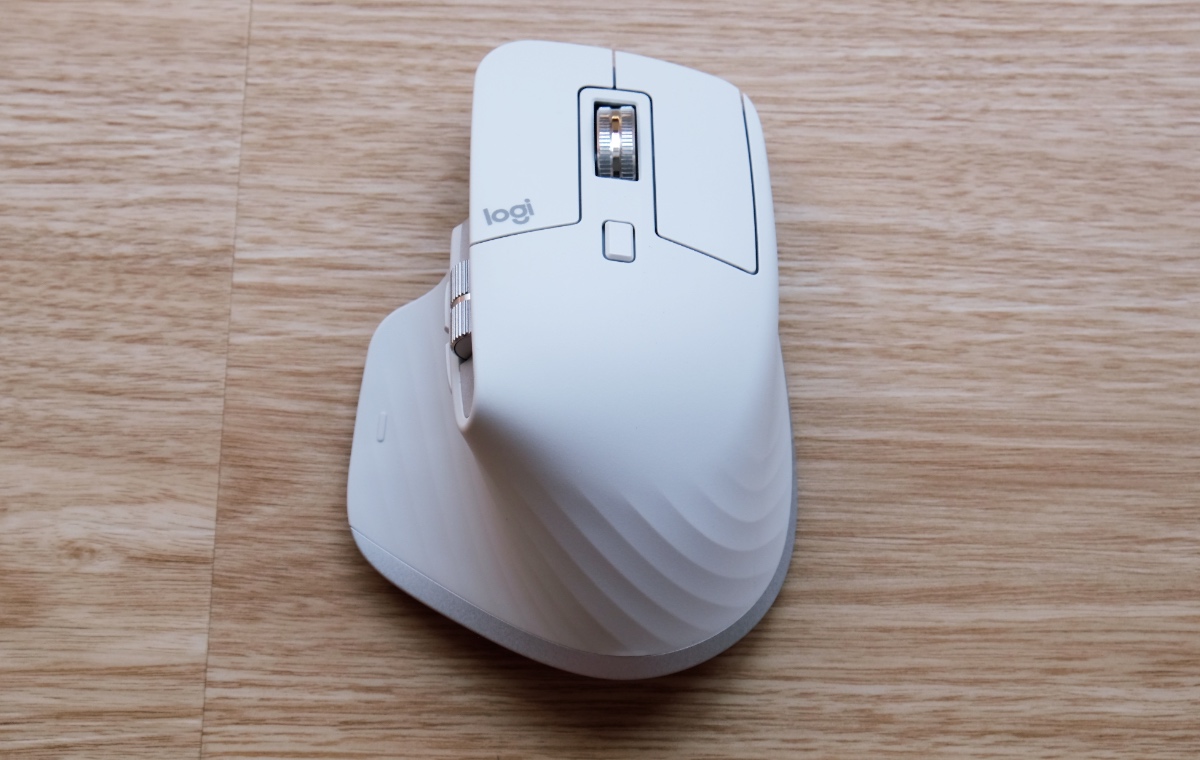
Frequently regarded as one of the top choices for both productivity and comfort, the Logitech MX Master 3s stands out due to its advanced ergonomic design and performance features. This mouse is crafted to fit your hand naturally, reducing strain during extended use. Its quiet buttons and improved sensor, boasting an impressive 8000Hz CPI range, enhance your workflow without distraction.
The MagSpeed electromagnetic scroll wheel is a standout feature, allowing you to scroll through up to 1,000 lines per second. This can greatly boost your efficiency when maneuvering through large documents or web pages. Additionally, the MX Master 3s supports multi-device connectivity, enabling seamless shifts between your computer, tablet, or other devices.
You’ll appreciate the USB-C charging capability, offering a quick recharge and an impressive standby battery life of up to 70 days. This means less downtime and more productivity.
With its durable stainless steel construction, the Logitech MX Master 3s combines aesthetics with functionality, making it a long-lasting investment for anyone seeking an ergonomic mouse that excels in both comfort and performance. Overall, it’s a solid choice for both professionals and gamers alike.
Frequently Asked Questions
How Do I Clean and Maintain an Ergonomic Mouse?
Think of your ergonomic mouse as a trusty steed; keep it clean by regularly wiping down surfaces with a microfiber cloth and using compressed air to remove debris. Regular maintenance guarantees longevity and peak performance.
Can Ergonomic Mice Help With Carpal Tunnel Syndrome?
Yes, ergonomic mice can help alleviate carpal tunnel syndrome symptoms. They promote a neutral wrist position, reducing strain on tendons and nerves. By minimizing awkward wrist angles, these mice can enhance comfort during prolonged computer use.
Are Ergonomic Mice Suitable for Gaming?
Yes, ergonomic mice are suitable for gaming. They reduce strain during long sessions, enhance comfort, and improve grip. Many models offer customizable buttons and adjustable DPI settings, catering to various gaming styles and preferences.
What Is the Average Lifespan of an Ergonomic Mouse?
The average lifespan of an ergonomic mouse typically ranges from three to five years, depending on usage intensity and build quality. Regular maintenance, such as cleaning, can also extend its functional life considerably.
Do Ergonomic Mice Come With a Warranty?
Just like a sturdy bridge needs support to last, ergonomic mice often come with warranties, ensuring you’re covered against defects. Typically, you’ll find warranties ranging from one to three years, depending on the brand.


